

Elementor Remove Custom CSS in WordPress? ( 2026 Elementor Issue Fixed )
- by Sync Life code Team

- March 26, 2026
If you work with Elementor regularly, you probably already know one of the most annoying problems developers face—Elementor removes custom CSS after an update. This issue is extremely common and almost everyone who builds WordPress websites has faced it at least once.
I have been working in web development for more than 6 years, and honestly, this single issue has confused many beginners. So today, I am going to explain why Elementor removes custom CSS, when it happens, and the easiest way to fix it.
And don’t worry, I will keep everything simple and human, exactly as we talk in real life.
Two Common Ways We Add Custom CSS in Elementor
When we create a website using Elementor, we usually add custom CSS in one of these two ways:
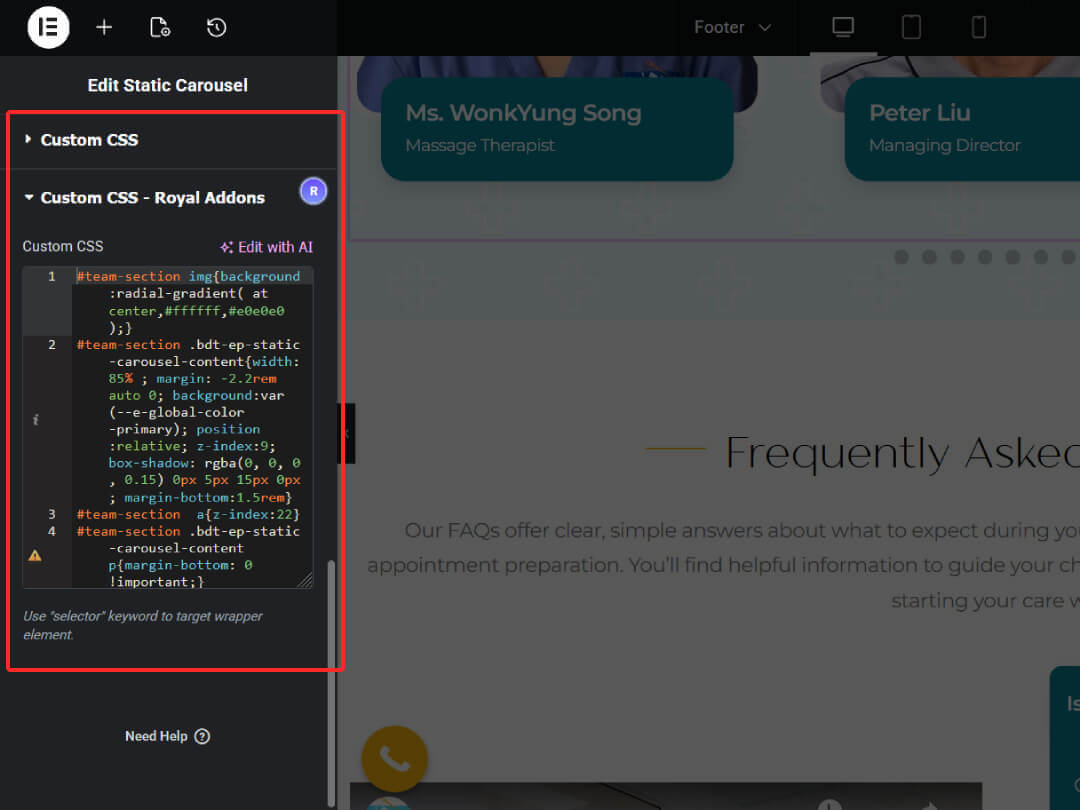
1. Elementor Page Builder → Module → Advanced → Custom CSS
This is the CSS added inside the Elementor widget/module itself.
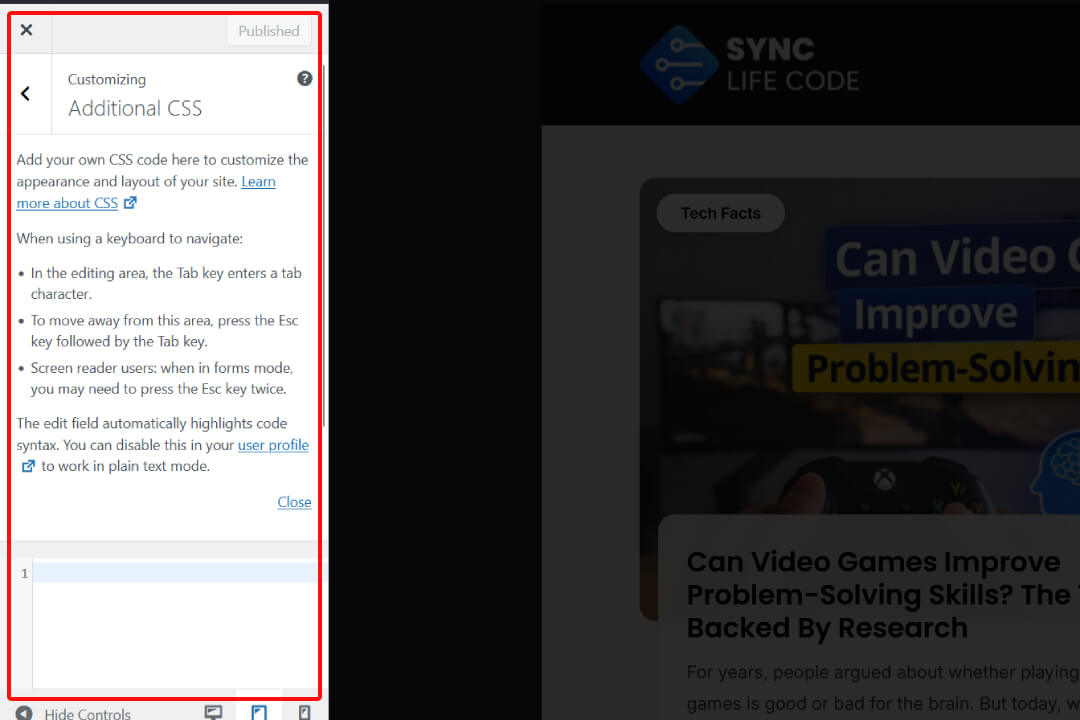
2. WordPress Appearance → Custom CSS
This is the default WordPress location for adding custom CSS.
Now, here is the main thing…
When we add CSS using the second method (WordPress Appearance → Custom CSS), that CSS can be removed or reset after updating Elementor.
But when we add CSS using the first method (inside the Elementor module), nothing gets removed.
So why does this even happen?
Why Elementor Removes Custom CSS in WordPress?
Most people think this is a bug, but actually it is a database path issue that happens during the update process.
Let me explain in a simple way:
When you update Elementor, it updates certain database values. During this update, Elementor sometimes changes or resets the custom CSS file path stored inside WordPress.
Because of this, the CSS appears empty in the frontend. But what’s interesting is that:
Your CSS file is still present in the backend.
Elementor just changes the reference path.
So basically, nothing is deleted. Elementor only disconnects the path of the custom CSS, which makes it look like it has been removed.
And this issue mostly affects people who add CSS through:
WordPress Appearance → Custom CSS
But CSS added inside Elementor modules remains completely safe.
Elementor Remove Custom CSS When We Update Elementor (2026 Issue)
Many users think this is a big issue, but in reality it is caused because Elementor tries to improve security and prevent unwanted code injections.
So in the update process, Elementor resets certain file paths to avoid any risky modifications.
But for us developers, this becomes a headache because our styling breaks on the frontend.
How to Fix Elementor Remove Custom CSS Issue?
Good news—the fix is extremely simple.
The safest and easiest method is to use a dedicated plugin that stores CSS properly and doesn’t depend on Elementor’s update paths.
Best Plugin to Fix This Issue
Use:
This plugin stores your CSS with its own structure, so Elementor updates cannot disturb or remove your code. You can also use alternative custom CSS plugins, but this one works best for most cases.
Just install the plugin → paste your CSS → save it.
And the issue is gone permanently.
This is the easiest and safest fix for:
- Elementor remove custom CSS
- Elementor remove custom CSS in WordPress
- How to fix Elementor remove custom CSS issue
- Elementor remove custom CSS after update
- Elementor remove custom CSS 2026
FAQs
1. Can I use a child theme to overcome this issue?
No. Child theme CSS can also face the same issue because Elementor still resets file paths during updates.
2. Is this a security issue?
No, this is not a security issue and it does not harm your website.
It only removes or disconnects the CSS path, which causes design issues.
3. How do I permanently fix this?
Use a safe and secure custom CSS plugin.
Plugins are not affected by Elementor update path changes.
4. Why does Elementor do this?
Elementor resets certain paths to improve website security and avoid unwanted modification in files. This helps prevent risky changes, but sadly, it affects custom CSS added through WordPress Appearance.
Final Words
Elementor is a powerful page builder, but sometimes small issues like this can waste a lot of our time. The Elementor remove custom CSS issue is common and nothing to worry about. Your CSS is usually safe in the backend—Elementor just changes the path.
Using a dedicated custom CSS plugin is the most reliable and long-term solution.
I hope this explanation helps you understand the issue clearly and fix it quickly.
If you want more tips on WordPress, security, and productivity tools, keep checking Sync Life Code for upcoming guides.